
TrafTerm Command Bar (Old)3.20 - Google Play
You'll be able to see results in few seconds.
Publisher Description
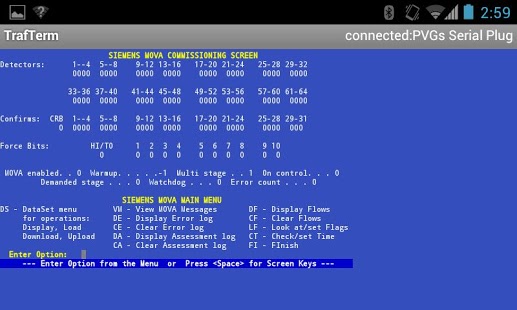
There are 2 versions of this program, ‘TrafTerm Command Bar’ using the depreciated Options Menu and ‘TrafTerm’ using the Action Bar. Since Android 3.0 the Action Bar has taken over from the original Android menu button.
Therefore I recommend if possible to use the newer 'TrafTerm' version of this program and NOT this version.
TrafTerm is an Android Intelligent Traffic Controller Handset, a terminal application for communicating with Traffic Light equipment.
TrafTerm is more than a simple Terminal Handset as it includes additional Utilities for performing specific Traffic Controller operations.
The program communicates via Bluetooth and a Bluetooth Serial RS232 adapter is required. For details of constructing both a Roving Networks and a ConnectBlue adapter and also a User Guide see my website.
User manual, bluetooth adapter build guides are stored here :
https://drive.google.com/folderview?id=0BxW6UZv73kklZUFHbjJiTEk1aFk
About TrafTerm Command Bar (Old)
The company that develops TrafTerm Command Bar (Old) is PVG. The latest version released by its developer is 3.20.
To install TrafTerm Command Bar (Old) on your Android device, just click the green Continue To App button above to start the installation process. The app is listed on our website since 2017-08-07 and was downloaded 0 times. We have already checked if the download link is safe, however for your own protection we recommend that you scan the downloaded app with your antivirus. Your antivirus may detect the TrafTerm Command Bar (Old) as malware if the download link to com.pvg.android.trafterm is broken.
How to install TrafTerm Command Bar (Old) on your Android device:
- Click on the Continue To App button on our website. This will redirect you to Google Play.
- Once the TrafTerm Command Bar (Old) is shown in the Google Play listing of your Android device, you can start its download and installation. Tap on the Install button located below the search bar and to the right of the app icon.
- A pop-up window with the permissions required by TrafTerm Command Bar (Old) will be shown. Click on Accept to continue the process.
- TrafTerm Command Bar (Old) will be downloaded onto your device, displaying a progress. Once the download completes, the installation will start and you'll get a notification after the installation is finished.
Program Details
System requirements
Download information
Pricing
Version History
version 3.20
posted on 2017-08-07
Peek Set Time Bug Fix
version 3.00
posted on 2015-09-30
Corrected 'Send Script File' error with correctly formatted UTF-8 script files including removal of initial BOM information.
version 2.40
posted on 2013-06-15
Several fixes and updates
Disclaimer
Official Google Play Link
We do not host the TrafTerm Command Bar (Old) app on our servers. We did not scan it for viruses, adware, spyware or other type of malware. This app is hosted by Google and passed their terms and conditions to be listed there. We recommend caution when installing it.
The Google Play link for TrafTerm Command Bar (Old) is provided to you by apps112.com without any warranties, representations or guarantees of any kind, so access it at your own risk.
If you have questions regarding this particular app contact the app developer directly. For questions about the functionalities of the apps112.com website, contact us.
